Tuesday, September 24, 2013

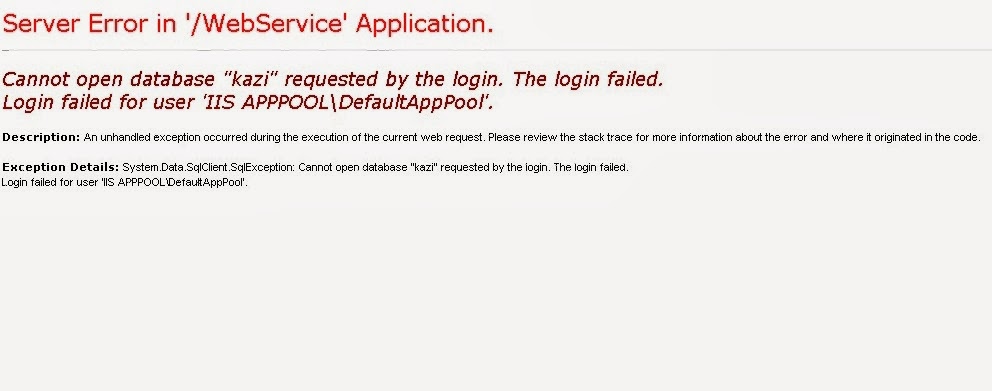
Server Error in IIS APPPOOL\DefaultAppPool

My self  face problem for hosting the web service from my local system .
So i finally decided to put this in my blog along with screen shots for easy understanding purpose.

Problem: The error as below:-


Solution:
The reason why you are seeing this screen is .. When browser requests a page, request goes the IIS (Internet  Information Services). If  the request needs some data from the SQL server IIS tries to access the SQL server With this Access name which dont have credentials to access that particular database. To Resolve this you have to give the permissions for the user to that particular database as follows.

Step1:

Start-Type-iis the below screen show -click on Internet Information Services(IIS) Manager.
 
Step2:

when u click on Internet Information Services(IIS) Manager. the scr as below

Next scr when see option :-

Click on Application pool scn short as below 

If you see in the above scrn shot i am already short the error to change the ApplicationPoolIdentity to LocalSystem .

 How to change the 

ApplicationPoolIdentity to LocalSystem .

defaultAppPool click on advance setting  (on right hand side u able to see)

the scn as below


change the ApplicationPoolIdentity to LocalSystem (i am already done it ..........know problem solve)


Thank you to read my blog ......welcome to share you knowledge ..........See you soon.


Saturday, September 21, 2013

How to read MS Excel file and display into GridView


Dear All
 Today  i am explain you How to read MS Excel file and display into GridView 


Step 1) open-Microsoft office Excel  and put same data inside it and save it any name as u line( i am use arjun.xls file name.The eg as an above)


Step 2) File-New-Projcet-Web-ASP.Net Web Application(Name as per your choice)

Note:-know time to VS u can use any version of VS for it( I am use vs 2008)

 Step 3)  Drop Gridview from toolbox in default.aspx page and Set AutoGenerateColums="false" in the Gridview property.


Step 4)  Edit the column in the Gridview(HeaderText-Address or DataFied =Address(as per excel))


Step 5)Go to default.aspx.cs add namespace (using System.Data; using System.Configuration;
using System.Data.OleDb;)


write a code in  Page_Load


the code are as below 


web.config code :-

<appSettings>
        <add key="Excel2003OleDBConnection" value="Provider=Microsoft.Jet.OLEDB.4.0; Data Source={0}; Extended Properties=&quot;Excel 8.0;HDR=YES;IMEX=1&quot;"/>
        <add key="Excel2007OleDBConnection" value="Provider=Microsoft.ACE.OLEDB.12.0;Data Source={0};Extended Properties=&quot;Excel 12.0 Xml;HDR=YES;IMEX=1&quot;"/>
    </appSettings>


default.aspx.cs Code :-

using System;
using System.Collections.Generic;
using System.Linq;
using System.Web;
using System.Web.UI;
using System.Web.UI.WebControls;
using System.Data;
using System.Configuration;
using System.Data.OleDb;

namespace exceltogridview
{
    public partial class _Default : System.Web.UI.Page
    {
        protected void Page_Load(object sender, EventArgs e)
        {
                        string file = Server.MapPath("~/App_Data/arjun.xls");
            string connStr =
                string.Format(ConfigurationManager.AppSettings["Excel2003OleDBConnection"], file);
            DataTable table = new DataTable();
            using (OleDbConnection conn = new OleDbConnection(connStr))
            {
                string sheet = @"SELECT * FROM [sheet1$]";// to avoid error write the sheet name in square bracket

                using (OleDbCommand cmd = new OleDbCommand(sheet, conn))
                {
                    conn.Open();
                    using (OleDbDataAdapter ad = new OleDbDataAdapter(cmd))
                    {
                        ad.Fill(table);
                    }
                    conn.Close();

                };
           
            }
            GridView1.DataSource = table;
            GridView1.DataBind();
            // to loop through the rows use foreach loop

            foreach (DataRow row in table.Rows)
            {

                string firstName = row["FirstName"].ToString();

            }
        }
    }
}


(Please Note :-see this path
"~/App_Data/arjun.xls"
i was keep my xls file in App_Data folder u can found this folder when u click on Solution Explorer )

Know time to come see output Press F5 
out are as blow


Welcome to add your contents and source code to this article


Monday, August 19, 2013

What is ViewState? In Asp.net

 
 What is ViewState?
This question ask to time of interview or it is comment question for ASP.Net Developer.

ViewState is used to maintain the state of controls during page postback and if we save any control values or anything in viewstate we can access those values throughout the page whenever it required for that
check


The Below i was create one ASPX page

<html xmlns="http://www.w3.org/1999/xhtml">
<head runat="server">
    <title>View State in asp.net Example</title>
</head>
<body>
    <form id="form1" runat="server">
    <div>
        <table>
            <tr>
                <td>
                    ViewState Data:
                </td>
                <td>
                    <b>
                        <asp:Label ID="lblString" runat="server" /></b>
                </td>
            </tr>
            <tr>
                <td>
                </td>
                <td>
                    <asp:Button ID="btnClick" runat="server" Text="Get ViewState Data" OnClick="btnClick_Click" />
                </td>
            </tr>
        </table>
    </div>
    </form>
</body>
</html>


Know Time to .cs file (add following namespaces in your code behind )
C# Code:-using System;

The full code as below :-

using System;
using System.Collections.Generic;
using System.Linq;
using System.Web;
using System.Web.UI;
using System.Web.UI.WebControls;

namespace AdoDotNetExample
{
    public partial class ViewState : System.Web.UI.Page
    {
        protected void Page_Load(object sender, EventArgs e)
        {
            if (IsPostBack)
            {
                string str = "WELCOME To MR.Arjun Walmiki Blog";
                if (ViewState["Simple Text"] == null)
                {
                ViewState["Simple Text"]=str;
                }
            }

        }

        protected void btnClick_Click(object sender, EventArgs e)
        {
            lblString.Text = ViewState["Simple Text"].ToString();
        }
    }
}
Run The program


if you Click on button  the result are as below :-


ViewState Data: WELCOME To MR.Arjun Walmiki Blog


Hope I help you 

Thank you Visit Here 

Arjun Walmiki

Keep Study see you soon