Dear All
Today i am explain you How to read MS Excel file and display into GridView
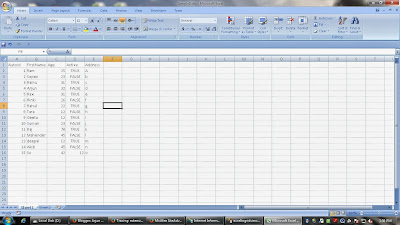 Step 1)
open-Microsoft office Excel and put same data inside it and save it any name as u line( i am use arjun.xls file name.The eg as an above)
Step 2) File-New-Projcet-Web-ASP.Net Web Application(Name as per your choice)
Note:-know time to VS u can use any version of VS for it( I am use vs 2008)
Step 3) Drop Gridview from toolbox in default.aspx page and Set AutoGenerateColums="false" in the Gridview property
.
Step 4) Edit the column in the Gridview(HeaderText-Address or DataFied =Address(as per excel))
Step 5)Go to default.aspx.cs add namespace (using System.Data; using System.Configuration;
using System.Data.OleDb;)
write a code in Page_Load
the code are as below
web.config code :-
<appSettings>
<add key="Excel2003OleDBConnection" value="Provider=Microsoft.Jet.OLEDB.4.0; Data Source={0}; Extended Properties="Excel 8.0;HDR=YES;IMEX=1""/>
<add key="Excel2007OleDBConnection" value="Provider=Microsoft.ACE.OLEDB.12.0;Data Source={0};Extended Properties="Excel 12.0 Xml;HDR=YES;IMEX=1""/>
</appSettings>
default.aspx.cs Code :-
using System;
using System.Collections.Generic;
using System.Linq;
using System.Web;
using System.Web.UI;
using System.Web.UI.WebControls;
using System.Data;
using System.Configuration;
using System.Data.OleDb;
namespace exceltogridview
{
public partial class _Default : System.Web.UI.Page
{
protected void Page_Load(object sender, EventArgs e)
{
string file = Server.MapPath("~/App_Data/arjun.xls");
string connStr =
string.Format(ConfigurationManager.AppSettings["Excel2003OleDBConnection"], file);
DataTable table = new DataTable();
using (OleDbConnection conn = new OleDbConnection(connStr))
{
string sheet = @"SELECT * FROM [sheet1$]";// to avoid error write the sheet name in square bracket
using (OleDbCommand cmd = new OleDbCommand(sheet, conn))
{
conn.Open();
using (OleDbDataAdapter ad = new OleDbDataAdapter(cmd))
{
ad.Fill(table);
}
conn.Close();
};
}
GridView1.DataSource = table;
GridView1.DataBind();
// to loop through the rows use foreach loop
foreach (DataRow row in table.Rows)
{
string firstName = row["FirstName"].ToString();
}
}
}
}
(Please Note :-see this path "~/App_Data/arjun.xls"
i was keep my xls file in App_Data folder u can found this folder when u click on Solution Explorer )
Know time to come see output Press F5
out are as blow
Welcome to add your contents and source code to this article