Tuesday, March 5, 2019

Best Practices for Naming a Variable

Hi all here i am show you how to naming a variable


  1. Choose a variable name that make sense. For example, nameagesubject makes more sense than na and s.
  2. Use camelCase notation (starts with lowercase letter) for naming local variables. For example, numberOfStudentsage, etc.
  3. Use PascalCase or CamelCase (starts with uppercase letter) for naming public member variables. For example, FirstNamePrice, etc.
  4. Use a leading underscore (_) followed by camelCase notation for naming private member variables. For example, _bankBalance_emailAddress, etc.
Thank you,
Arjun walmiki

Thursday, December 27, 2018

How to Creating a Bing Maps Key

Creating a Bing Maps Key

  1. Go to the Bing Maps Dev Center at here.
After success Login you can see below screen :-


Click on "My account" Tab you can see below option select "My keys"

if you want new key than you have to click here to create a new key.
But if you have already key and you want to see you key than you have to select 2nd option.


 In next blog i will explain you how to How to display bing map using this or without key.

Thank you .

Web Services Interview Questions and answers – SOAP, RESTful

Welcome to the Web Services some Interview Questions with detailed answers.

What is a Web Service?

Web Services work on client-server model where client applications can access web services over the network. Web services provide endpoint URLs and expose methods that can be accessed over network through client programs written in C#, shell script or any other different technologies.
Web services are stateless and doesn’t maintain user session like web applications.

What is SOAP?

SOAP stands for Simple Object Access Protocol. SOAP is an XML based industry standard protocol for designing and developing web services. Since it’s XML based, it’s platform and language independent. So our server can be based on JAVA and client can be on .NET, PHP etc. and vice versa.

What is WSDL?
WSDL stands for Web Service Description Language. WSDL is an XML based document that provides technical details about the web service. Some of the useful information in WSDL document are: method name, port types, service end point, binding, method parameters etc.
What are different components of WSDL?
Some of the different tags in WSDL xml are:
    • xsd:import namespace and schemaLocation: provides WSDL URL and unique namespace for web service.
    • message: for method arguments
    • part: for method argument name and type
    • portType: service name, there can be multiple services in a wsdl document.
    • operation: contains method name
    • soap:address for endpoint URL.

What is REST Web Services?

REST is the acronym for REpresentational State Transfer. REST is an architectural style for developing applications that can be accessed over the network. REST architectural style was brought in light by Roy Fielding in his doctoral thesis in 2000.
REST is a stateless client-server architecture where web services are resources and can be identified by their URIs. Client applications can use HTTP GET/POST methods to invoke Restful web services. REST doesn’t specify any specific protocol to use, but in almost all cases it’s used over HTTP/HTTPS. When compared to SOAP web services, these are lightweight and doesn’t follow any standard. We can use XML, JSON, text or any other type of data for request and response.
What are advantages of REST web services?
Some of the advantages of REST web services are:
  • Learning curve is easy since it works on HTTP protocol
  • Supports multiple technologies for data transfer such as text, xml, json, image etc.
  • No contract defined between server and client, so loosely coupled implementation.
  • REST is a lightweight protocol
  • REST methods can be tested easily over browser.

What are disadvantages of REST web services?

Some of the disadvantages of REST are:
  • Since there is no contract defined between service and client, it has to be communicated through other means such as documentation or emails.
  • Since it works on HTTP, there can’t be asynchronous calls.
  • Sessions can’t be maintained.

What is a Resource in Restful web services?

Resource is the fundamental concept of Restful architecture. A resource is an object with a type, relationship with other resources and methods that operate on it. Resources are identified with their URI, HTTP methods they support and request/response data type and format of data.

What are different HTTP Methods supported in Restful Web Services?

Restful web services supported HTTP methods are – GET, POST, PUT, DELETE and HEAD.

Compare SOAP and REST web services?

SOAPREST
SOAP is a standard protocol for creating web services.REST is an architectural style to create web services.
SOAP is acronym for Simple Object Access Protocol.REST is acronym for REpresentational State Transfer.
SOAP uses WSDL to expose supported methods and technical details.REST exposes methods through URIs, there are no technical details.
SOAP web services and client programs are bind with WSDL contractREST doesn’t have any contract defined between server and client
SOAP web services and client are tightly coupled with contract.REST web services are loosely coupled.
SOAP learning curve is hard, requires us to learn about WSDL generation, client stubs creation etc.REST learning curve is simple, POJO classes can be generated easily and works on simple HTTP methods.
SOAP supports XML data format onlyREST supports any data type such as XML, JSON, image etc.
SOAP web services are hard to maintain, any change in WSDL contract requires us to create client stubs again and then make changes to client code.REST web services are easy to maintain when compared to SOAP, a new method can be added without any change at client side for existing resources.
SOAP web services can be tested through programs or software such as Soap UI.REST can be easily tested through CURL command, Browsers and extensions such as Chrome Postman.

What are different types of Web Services?

There are two types of web services:
  1. SOAP Web Services: Runs on SOAP protocol and uses XML technology for sending data.
  2. Restful Web Services: It’s an architectural style and runs on HTTP/HTTPS protocol almost all the time. REST is a stateless client-server architecture where web services are resources and can be identified by their URIs. Client applications can use HTTP GET/POST methods to invoke Restful web services.


Here i am explain you very few question those i am face during my Interview.
I take reference from here for more reading you can follow same link.

Thank you.

Tuesday, December 11, 2018

How to override bootstrap-rating.min.js .

Hi friends ,

Total i will Explain you how to override "bootstrap-rating.min.js".

Special Thank to my friend "vedant.malaikar" he tech me this skill.

So friends is you are new in jquery ajax that is very nice article to you.
 How to create your custom function and  override "bootstrap-rating.min.js".

This is Kartik Visweswaran min.js file if you want to override it.Your are on correct Place.

/*!
 * bootstrap-star-rating v4.0.2
 * http://plugins.krajee.com/star-rating
 *
 * Author: Kartik Visweswaran
 * Copyright: 2013 - 2017, Kartik Visweswaran, Krajee.com
 *
 * Licensed under the BSD 3-Clause
 * https://github.com/kartik-v/bootstrap-star-rating/blob/master/LICENSE.md

In My case i want 10 starts with small size you can change want you want according to your requirement.
So let's start
Step 1:-
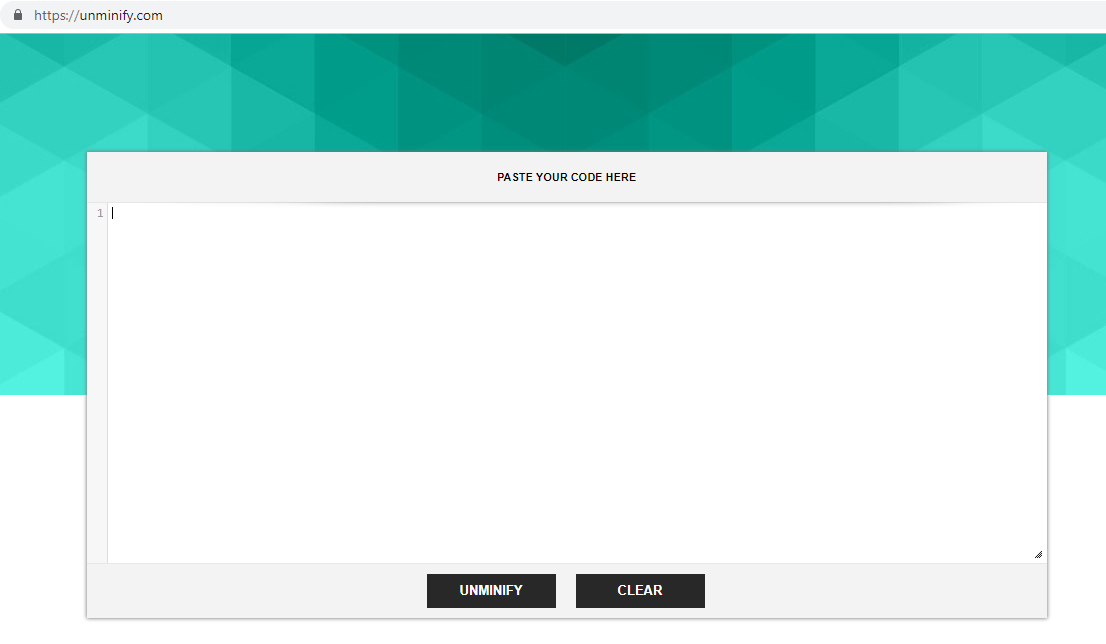
Go to unminify.com
Step 2:-
Paset your bootstrap file inside it and click unminify button.

Check your property which property you want to override.

Step 3:-
Go to you View .

 <div class="text-center m-t-md">
                        <input type="button" id="input-3" name="input-3" class="rate" data-min="0" data-max="10" data-step="1" value="0">
                    </div>

An inside the script wrote below code:-

<script type="text/javascript">

    $(document).ready(function () {

$(".rate").rating({
            size: 'xs',
            stars: 10
        });
 });
</script>


!!!!!!!!!!!!!!!!!!!!!!!!!!Thank you!!!!!!!!!!!!!!!!!!!!!!!!!!!!!!!!


Monday, November 26, 2018

error in MVC entity framework

Hi all if you are using code first approach in entity framework and you are facing below error.

the solution are as below :-
update-database.


this is solution .

.........................Thank you .................

Wednesday, November 14, 2018

Difference between WriteLine() and Write() method


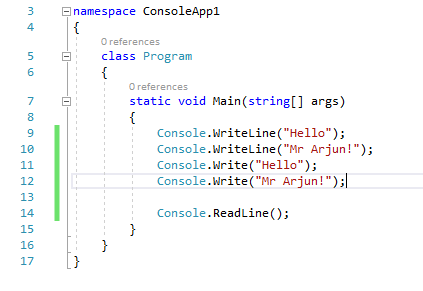
The main difference between WriteLine() and Write() is that the Write() method only prints the string provided to it, while the WriteLine() method prints the string and moves to the start of next line as well.
Let's take at a look at the example below to understand the difference between these methods.

Example 1: How to use WriteLine() and Write() method?

When we run the program, the output will be


Thank you

Creating DLL and consuming it using C#


Description
DLL  Stand for  (Dynamic Link Library).
How to create a DLL and consuming it  because most of the reusable components are written in the form of a DLL.


Create DLL.

Step 1
First, create a project of type “Class Library” as shown here.


Then we are implementing a Fullname class library that is responsible for show fullname of user.


Step 3
Build this code and you will see that a DLL file has been created rather than an exe in the root directory of the application (path = C:\Users\Admin\Documents\visual studio 2017\Projects\LibraryForDLL\LibraryForTest\bin\Debug\netstandard1.4\ LibraryForTest.dll).

Consume the DLL
Step 1
 
Now create another console based application(Any project) where we will utilize the class library functionality.In my case i am created new project in same Solution Explorer.


Step 2
 
Then you need to add the reference of the Fullname Class Library DLL file reference to access the declared class in the library DLL. (Right-click on the Reference then select Add reference then select the path of the DLL file.)

Step 3
 
When you add the class library reference then you will see in the Solution Explorer that a new LibraryForTest is added as in the following,


Step 4
 
Now add the namespace of the class library file in the console application and create the instance of the class declared in the library as follows,


Step 5
Finally, run the application and you must see the result as shown in the image below.


;;;;;;;;;;;;;;;;;;;;;;;;;Thank you ;;;;;;;;;;;;;;;;;